jeus
Edit- Jeus에서 다른 context의 클래스 파일을 참조하고자 할때 http://openframework.or.kr/blog/?p=214
- JeusJDBC.pdf
- JeusJNDI관련.pdf
- web class 변경 시 jeus 재구동 안하는 방법
- 노드명을 한글로 사용한 경우
- [JEUS, WebtoB] 기본환경구성
Jeus 한글설정
scfg1
scfg1 is an alias for 'cd $JEUS_HOME/config/${HOST_NAME}/${HOST_NAME}_servlet_engine1'
WEBMain.xml 에서 encoding 부분 추가 또는 수정
<web-container>
    <redirect-stdout>true</redirect-stdout>
    <redirect-stderr>true</redirect-stderr>
    <context-group>
        <group-name>EduGroup</group-name>
        <group-docbase>webapps</group-docbase>
        <print-error-to-browser>true</print-error-to-browser>
        <encoding>
                <request-encoding>
                    <forced>EUC-KR</forced>
                </request-encoding>
                <response-encoding>
                    <forced>EUC-KR</forced>
                </response-encoding>
                <postdata-encoding>
                    <forced>EUC-KR</forced>
                </postdata-encoding>
        </encoding>
        <session-config>
            <timeout>20</timeout>
            <shared>true</shared>
            <persistent>true</persistent>
        </session-config>
        <jsp-engine>
            <keep-generated>true</keep-generated>
            <java-compiler>javac</java-compiler>
            <jsp-work-dir>/edudocs/jspwork</jsp-work-dir>
            <compile-encoding>EUC-KR</compile-encoding>
        </jsp-engine>
        <logging>
            <error-log>
                <target>file</target>
                <level>error</level>
                <buffer-size>0</buffer-size>
                <valid-day>1</valid-day>
            </error-log>
            <user-log>
                <target>file</target>
                <buffer-size>0</buffer-size>
                <valid-day>1</valid-day>
            </user-log>
            <access-log>
                <target>file</target>
                <buffer-size>0</buffer-size>
                <valid-day>1</valid-day>
                <log-format>
                    <time-format>default</time-format>
                </log-format>
            </access-log>
        </logging>
        <context>
            <context-name>default</context-name>
            <context-path>/</context-path>
        </context>
        <context>
            <context-name>examples</context-name>
            <context-path>/examples</context-path>
        </context>
        <webserver-connection>
            <webtob-listener>
                <listener-id>WebtobListener</listener-id>
                <port>9900</port>
                <output-buffer-size>8192</output-buffer-size>
                <webtob-address>localhost</webtob-address>
                <registration-id>EduGroup</registration-id>
                <hth-count>1</hth-count>
                <thread-pool>
                    <min>30</min>
                    <max>30</max>
                    <step>1</step>
                    <max-idle-time>1000</max-idle-time>
                </thread-pool>
            </webtob-listener>
<!--
            <http-listener>
                <listener-id>http1</listener-id>
                <port>8088</port>
                <output-buffer-size>8192</output-buffer-size>
                <thread-pool>
                    <min>25</min>
                    <max>30</max>
                    <step>2</step>
                    <max-idle-time>1000</max-idle-time>
                </thread-pool>
            </http-listener>
-->
        </webserver-connection>
    </context-group>
</web-container>
운영자매뉴얼(TmaxSoft)
별첨4]
e-감사시스템 구축1차 사업 / 운영자 매뉴얼 (WebtoB / JEUS)
- 1

관리본개정이력표
| 문서명 | 운영자 매뉴얼 |
|---|
| 버전 | 날짜 | 내 용 | 부서 |
|---|---|---|---|
| 1.0 | 2005. 07. 01 | 최초작성 | e-감사시스템구축 프로젝트 |
목 차
- WEBTOB와 JEUS 소개 및 개요
- 1.1 개요
- 1.2 시스템 구성 및 환경
- 1.3 WebtoB
- 1.3.1 소프트웨어 구성
- 1.4 JEUS
- 1.4.1 소프트웨어 구성
- WebtoB 관리 지침
- 2.1 WebtoB 환경 파일
- 2.1.1 환경 파일 경로
- 2.1.2 환경 파일 설정 및 컴파일
- 2.2 WebtoB 구동 및 종료
- 2.2.1 WebtoB 구동
- 2.2.2 WebtoB 종료
- 2.3 wsadmin 사용하기
- 2.3.1 요청에 대한 전체 건수 보기
- 2.3.2 요청한 클라이언트의 정보보기
- 2.3.3 *SERVER 절에 선언한 서버들의 수행정보 보기
- 2.3.4 전체 서비스 처리되는 상태정보 보기
- 2.3.5 *SERVER 절에 설정된 프로세스의 처리정보 보기
- 2.4 로그 정보
- JEUS 관리 지침
- 3.1 JEUS 환경 파일
- 3.1.1 환경 파일 경로
- 3.1.2 환경 파일 설정
- 3.2 JEUS 구동 및 종료
- 3.2.1 JEUS 구동
- 3.2.2 JEUS 종료
- 3.3 jeusadmin 사용하기
- 3.3.1 현재 떠있는 엔진 목록보기
- 3.3.2 현재 떠 있는 엔진컨테이너 PID 목록보기
- 3.4 webadmin 사용하기
- 3.4.1 web container 의 상태정보 보기
- 3.4.2 호출된 애플리케이션 정보보기
- 3.4.3 Web Server(WebtoB) 와 JEUS 간의 연결 Thread 정보보기
- 3.5 ejbadmin 사용하기
- 3.5.1 ejb 로딩 정보보기
- 3.5.2 모듈안에 포함된 EJB 정보보기
- 3.5.3 모듈안에 포함된 EJB Pooling 현황 정보보기
- 3.6 dbpooladmin
- 3.6.1 정보보기
- 3.7 로그 정보
- 3.7.1 로그 파일 위치
- 3.7.2 Servlet 엔진 로그
- 3.7.3 EJB 엔진 로그
- WebtoB, Java 그리고 JEUS 튜닝 팁들
- 4.1 WebtoB 튜닝 팁들
- 4.1.1 HTH 수
- 4.1.2 프로세스 수
- 4.2 Java 튜닝 팁
- 4.2.1 JVM Heap 크기
- 4.3 JEUS Tuning Tips
- 4.3.1 Thread 수
- 4.3.2 JDBC Datasource connection Pool
- 4.3.3 Connection Pool 크기 설정
- 4.3.4 Prepared Statements 캐싱과 statement fetch 크기 설정
- OS Parameter 튜닝
- 5.1 Linux OS
- 5.1.1 Linux kernel parameter 와 Network parameter 튜닝
- 5.2 Solaris OS 튜닝 권장
- 5.2.1 Linux kernel parameter 와 Network parameter 튜닝
1. WebtoB와 JEUS 소개 및 개요
1.1 개요
본 문서는 감사원 e-감사시스템구축 프로젝트에서 WebServer인 WebtoB와 WAS인 JEUS를 운영하는데 도움이 되고자 작성되었다.
편의상 본 문서를 참고할 대상은 WebtoB와 JEUS에 대해서 기본적인 지식을 가지고 있다고 가정하에 만들어 졌으며 시스템 및 WebtoB와 JEUS 운영중 기본 지침서가 되도록 하였다.
1.2 시스템 구성 및 환경
시스템 서버의 시스템 구성과 그에 따른 WebtoB와 JEUS의 환경 파일을 통한 시스템 구성 현황에 대해서 살펴보고자 한다.
1.4 JEUS
JEUS (Java Enterprise-User Solution)는 인터넷으로 각광 받고 있는 Java를 기반으로 한 웹 솔루션으로, 웹 환경에서 어플리케이션을 운용하는 데 필요한 각종 서비스들을 제공해 주는 웹 어플리케이션 서버이다.
JEUS는 어플리케이션을 개발하고 실행할 수 있는 플랫폼 역할을 하면서, 트랜잭션 관리, 세션 유지, 부하 분산 등 다양한 기능을 제공할 뿐만 아니라, 계층화된 구조로 유연성과 기능 확장성이 우수해 비즈니스 로직을 손쉽고 효과적으로 구현할 수 있게 한다.
1.4.1 소프트웨어 구성
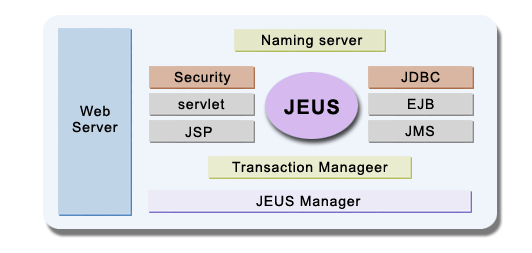
 Web Server
- HTTP Listener를 통해 클라이언트의 요청을 받아들입니다.
- 자체적인 Web Server와 함께 WebtoB나 Apache와 같은 기존의 웹 서버와도 연동이 가능합니다.
 System Management Servers
- 엔진들의 동작과 시스템의 관리를 위한 기반 구조를 제공합니다.
- Naming Server, Security, JDBC Connection Pool 등의 기능으로 엔진들 사이의 동작을 이어 줍니다. 또한 Transaction Manager, JEUS Manager 등의 기능으로 트랜잭션, 장애 대책, 부하 조절, 로깅 등 전체 시스템을 관리하는 역할을 수행합니다.
 Engine Modules
- JSP, Servlet, EJB, JMS 등의 다양한 개발 모듈을 제공합니다.
- 각각 다른 프로그래밍 모델을 바탕으로 개발된 서비스들이라 할지라도 하나의 웹 시스템 내에서 동작할 수 있는 환경을 제공해 줍니다.
3. JEUS 관리 지침
3.1 JEUS 환경 파일
3.1.1 환경 파일 경로
$JEUS_HOME/config/[hostname]/에 환경 파일이 있다.
3.1.2 환경 파일 설정
환경 파일은 JEUS의 환경 설정파일 JEUSMain.xml과 각 ejb, servlet엔진 파일로 구성된다. JEUSMain.xml은 $JEUS_HOME/config/[hostname]/JEUSMain.xml에 위치하며 servlet엔진의 경우에는 각각 다음의 위치에 존재한다.
Servlet엔진의 환경 설정 파일
$JEUS_HOME/config/[hostname]/[hostname]_servlet_[engine이름]/WEBMain.xml
EJB엔진의 환경 설정 파일
$JEUS_HOME/config/[hostname]/[hostname]_ejb_[engine이름]/EJBMain.xml
각 환경 설정 파일 설정의 세부적인 내용에 대한 것은 매뉴얼을 참조 하기 바란다.
3.2 JEUS 구동 및 종료
3.2.1 JEUS 구동
jboot를 실행하면 구동된다.
실행)
jboot
예)
[계정@hostname] jboot
3.2.2 JEUS 종료
jdown을 실행하면 종료가 된다.
실행)
jdown
예)
[계정@hostname] jdown
3.3 jeusadmin 사용하기
실행)
jeusadmin
예)
[계정@hostname]jeusadmin hostname
[ErrorMsgManager] Message Manager is initialized
[JeusCommander] JEUS 4.2.0.9 Jeus Manager Controller
[JeusCommander] Login
> administrator
[JeusCommander] Password
> jeusadmin <--- passwd값을 입력한다.
[JeusCommander] [admin] login successful
hostname>
도움말 실행)
help
예)
hostname> help
========================================================
 jeusadmin commands
- allenglist : get a list of all working engines
- boot [ |-ser] [ |-d] : boot Jeus Manager
ex> boot -d -> boot node dynamically with JEUSMain.xml
 - down : down JeusServer
---중략---
========================================================
hostname>
나오기)
exit
예)
hostname> exit
[root@hostname]
3.3.1 현재 떠있는 엔진 목록보기
hostname 서버에서 JVM 6개가 엔진 container로 구동중이며 2개의 container에서 servlet 엔진, 4개의 container에 ejb 엔진이 구동되고 있다.
[계정@hostname] jeusadmin
[ErrorMsgManager] Message Manager is initialized
[JeusCommander] JEUS 4.2.0.9 Jeus Manager Controller
[JeusCommander] Login
> administrator
[JeusCommander] Password
> jeusadmin
[JeusCommander] [administrator] login successful
hostname> allenglist
hostname_servlet_engine1
hostname>
위와 같이 실행하면 모든 엔진 목록을 볼수 있다. 또한 위의 각 엔진들을 boot 또는 down을 시킬수 있다.(help 참조)
방법: starteng / downeng
3.3.2 현재 떠 있는 엔진컨테이너 PID 목록보기
엔진컨테이너는 각각의 엔진을 담는 그릇과 같은 것으로 JVM 1개를 의미한다
hostname> pidlist
hostname_engine1 : 28588
hostname>
현재 운영중인 6개의 JVM에 대한 PID할당 정보를 얻을 수 있으며, 향후 문제 발생시 Thread Dump를 수행하기 위하여 (kill -3) 필요한 정보이기도 하다.
또한 위의 엔진컨테이너를 booting / down할 수도 있다. (help 명령어 참조)
방법 : startcon / downcon
예) startcon hostname_engine1
3.4 webadmin 사용하기
실행)
webadmin _servlet_
예)
[계정@hostname]/jeus/jeus42/bin >webadmin hostname_servlet_engine1
$ username : administrator
$ password : jeusadmin <--- passwd값을 입력한다.
[ErrorMsgManager] Message Manager is initialized
[2005.04.01 16:09:59] [TMLinkManager] accept thread is started
[2005.04.01 16:09:59] [TMClient] TMClient initailized
[2005.04.01 16:09:59] [JNSLocal_] Try to connect to 10.100.88.5:9438
[2005.04.01 16:09:59] [JNSLocal_] Connected to JNSServer IPAddress :9438
[2005.04.01 16:09:59] [JNSLocal_] Successfully started. (ID IPAddress :61301)
-- Welcome to JEUS Web Container(v3.3.7.2) Admin
$$1 [hostname:hostname_servlet_engine1]
도움말 실행)
help
예)
$$1 [hostname:hostname_servlet_engine1] help
-- Command list & Usages --
* st(stat) [OPTION] : report current state
-m memory state
-t thread state
-r the number of requests
-s session state
-d DB pool state
* ti [OPTION] : report detailed thread state
-p [addr:]port thread information
-r request information of threads
-a all information of threads
--- 중략 ---
나오기)
exit
예)
$$2 [hostname:hostname_servlet_engine1] exit
[root@hostname]/jeus/jeus42/bin>
3.4.1 web container의 상태정보 보기
$$1 [hostname:hostname_servlet_engine1] st
-- WebContainer [hostname_servlet_engine1] --
< memory information >
VM Total Memory = 267255808 Bytes
VM Free Memory = 252605688 Bytes
-- ContextGroup [KUContextGroup] --
< thread information >
WebtobListener[port:9900] Current thread = 40, Wait Queue Count = 0, Max thread = 0
hth0 [port: 9300] live connections = 20
hth1 [port: 9901] live connections = 20
< request information >
__DEFAULT_CONTEXT__ : request = 0, avgTime = -1 ms
KUContext : request = 0, avgTime = -1 ms
< session information >
session clustering version : 1
number of local sessions : 2
Command is successfully achieved...
$$2 [hostname:hostname_servlet_engine1]
st 명령을 수행하게 되면 다음의 목록을 리스팅한다.
해당 jvm의 메모리 사용현황 :
st -mDBConnectionPool의 실시간 사용현황 :
st -dWeb Server와의 연결 정보 :
st -t설정한 Context로 들어온 요청 count와 평균처리시간 :
st -r유지하고 있는 Session 객체의 개수 :
st -s
위에서 주의 깊게 보아야 할 것은 다음과 같다.
jvm의 메모리 사용현황을 통하여 애플리케이션상의 Memory leak 현상을 없는지 파악하여야 한다. 즉 jvm의 메모리 사용이 계속 증가하면 이를 의심해 보아야 한다.
DBConnectionPool의 Init DB conns 값 빼기 Free DB connections 의 개수가 0보다 크면 현재 사용되고 있는 connection의 개수를 나타내며, 이를 통해 호출 정도를 대략 파악할 수 있다. (단, DBConnectionPool type종류중 dummy는 모니터링이 불가능하다.)
- 일반 DB : shared, non-shared
- DB가 아닌 경우(예 AmdocsDriver) : shared:non-jeus, non-shared:non-jeus, dummy
- Session Information을 통해서는 현재 login을 통하여 들어와 있는 유저수를 알 수 있다.
연속 보기 : st -i 1 -k 100 (1초 간격으로 100번 반복하여 수행하기)
3.4.2 호출된 애플리케이션 정보보기
$$2 [hostname:hostname_servlet_engine1] info
<<< WebContainer Name: hostname_servlet_engine1 >>>
#### ContextGroup : ContextGroup
#### Context : __DEFAULT_CONTEXT__
0:[WorkerServlet] class: jeus.servlet.servlets.WorkerServlet , total_reqs: 0
#### Context : KUContext
0:[/A/B/C.jsp] <Ready> jspfile: /A/B/C.jsp, total_reqs: 4
1:[/A/B/C.jsp] <Ready> jspfile: /A/B/C.jsp, total_reqs: 9
2:[/A/B/C.jsp] <Ready> jspfile: /A/B/C.jsp, total_reqs: 1
3:[/A/B/C.jsp] <Ready> jspfile: /A/B/C.jsp, total_reqs: 27
4:[test html] <NotLoaded> class: test.hnwhtml, total_reqs: 0
5:[/A/B/C.jsp] <Ready> jspfile: /A/B/C.jsp, total_reqs: 25
--- 중략 ---
각 ContextGroup안에 있는 Context별 호출된 애플리케이션의 호출빈도수를 알아 볼 수 있다. 이를 통해서 많이 호출되고 있는 애플리케이션를 축출할 수가 있다.
연속 보기 : info -i 1 -k 100 (1초 간격으로 100번 반복하여 수행하기)
3.4.3 Web Server(WebtoB)와 JEUS간의 연결 Thread 정보보기
$$13 [hostname:hostname_servlet_engine1] ti
-- Thread State [localhost:9300] --
[webtob-9300-w0][waiting, wt=135811 ms]
[webtob-9300-w1][waiting, wt=128943 ms]
[webtob-9300-w2][waiting, wt=125440 ms]
[webtob-9300-w3][waiting, wt=125019 ms]
--- 중략 ---
[webtob-9300-w37][waiting, wt=164001 ms]
[webtob-9300-w38][waiting, wt=160069 ms]
[webtob-9300-w39][waiting, wt=146275 ms]
[ total : 40 active : 0 idle : 40 ]
Command is successfully achieved...
$$14 [hostname:hostname_servlet_engine1]
위의 정보를 통하여 정보를 통하여 현재 실시간으로 들어오고 있는 uri 정보를 볼 수가 있다. 단 QueryString정보는 나타나지 않는다. 이를 보기위해서는 accesslog를 통하여 보아야 한다.
ti 정보를 통해서는 rt(=run time)라는 수행시간정보를 통하여 해당 호출된 서비스가 waiting에 빠졌는지, 처리가 얼마나 걸리는지를 실시간 모니터링 할 수가 있다. 만일 rt 시간이 비정상적으로 길어지거나, 모든 연결 Thread가 꽉차서 여유 공간이 없다면, waiting 또는 hanging 현상을 의심해보고 Thread Dump를 통하여 원인을 찾도록 한다.
방법 : kill -3
추적 : webtob-9300-w39 해당 이러한 이름이 Thread Name이 된다.
위치 : 보통 stdout로 지정한 곳에 Thread Dump 내용이 남게 되며, Thread Name을 가지고 찾으면 된다.
PID정보는 jeusadmin의 pidlist 명령어를 통하여 servlet engine이 포함된 container의 PID를 넣도록 한다.
연속 보기 : ti -i 1 -k 100 (1초 간격으로 100번 반복하여 수행하기)
전체 정보보기 : ti -a
[webtob-9932-w0][waiting, 2003.02.27 09:54:35, wt=613162 ms][req=0, avgTime=0 ms, total=0][alive=true]
요청을 처리한 건수 및 처리시간 평균을 보여준다.
3.5 ejbadmin 사용하기
실행)
ejbadmin _ejb_
예)
hostname::/install DIR >ejbadmin sune10000_ejb_engine1
[ErrorMsgManager] Message Manager is initialized
[EJBServerCommander] JEUS 3.3.2.1 EJB Engine Controller
[EJBServerCommander] Login :
> admin
[EJBServerCommander] Password :
> <--- passwd값을 입력한다.
[hostname]_ejb_engine1 >
도움말 실행)
help
예)
[hostname]_ejb_engine1> help
=======================================================
ejbadmin command
- suspend [module name] : suspend services for the module
ex> suspend hello -> suspend hello module
- resume [module name] : resume services for the module
ex> resume hello -> resume hello module
- reload [module name] [ |-ser] [ |-f] : reload the module
ex> reload hello -ser -> reload hello as normal deployment using .ser config file
---중략---
======================================================
[hostname]_ejb_engine1>
나오기)
exit
예)
[hostname]_ejb_engine1> exit
hostname::/install DIR >
3.5.1 ejb 로딩 정보보기
[hostname]_ejb_engine1> modulelist
ejb_module_name
[hostname]_ejb_engine1>
jeus는 ejb를 모듈단위로 관리된다. 현재 떠있는 모듈의 리스트를 볼 수가 있다. 부팅시 모듈을 띄우는 정보는 EJBMain.xml 파일에 라는 태그로 지정한다.
3.5.2 모듈안에 포함된 EJB 정보보기
[hostname]_ejb_engine1> beanlist pfejabonmgr
A.B.C.D Bean : running
A.B.C.D Bean : running
A.B.C.D Bean : running
A.B.C.D Bean : running
----중략---
A.B.C.D Bean : running
A.B.C.D Bean : running
[hostname]_ejb_engine1>
beanlist 을 넣게 되면 해당 모듈에 포함된 EJB의 정보를 볼 수가 있다.
3.5.3 모듈안에 포함된 EJB Pooling 현황 정보보기
[hostname]_ejb_engine1> moduleinfo module_name
[2005.04.01 17:07:32]
module-name : module_name
bean-name : A.B.C.D Bean
pooled bean : 0
active bean : 0
pooled conn : 0
active conn : 0
pooled thread : 0
active thread : 0
bean-name : A.B.C.D Bean
pooled bean : 0
active bean : 0
pooled conn : 0
active conn : 0
pooled thread : 0
active thread : 0
----중략----
[hostname]_ejb_engine1>
위의 정보를 통해서 moduleinfo 을 통해서 들어있는 전체 bean들의 Pooling 현황을 보거나, beaninfo 을 통해서 해당 bean Pooling 정보만을 얻어 낼 수가 있다. 위의 명령어를 통하여 active bean의 사용정도를 파악 할 수 있으며, waiting 현상에 및 장애에 대한 추측을 가능토록 하여준다.
- command : moduleinfo module-name [option], beaninfo bean-name [option]
- option : -i (간격) , -k (횟수) [optional option]
module-name/bean-name을 all 이라고 주면 전체를 monitoring한다
3.6 dbpooladmin
실행)
dbpooladmin _
예)
hostname::/install DIR >dbpooladmin sune10000_engine1
[ErrorMsgManager] Message Manager is initialized
[2005.04.01 17:19:04] [TMLinkManager] accept thread is started
[2005.04.01 17:19:04] [TMClient] TMClient initailized
[ConnectionPoolController] JEUS 4.2 DB Connection Pool Controller
[ConnectionPoolController] Login :
> admin
[ConnectionPoolController] Password :
> <--- passwd값을 입력한다.
[hostname]_engine1>
도움말 실행)
help
예)
[hostname]_engine1> help
=======================================================
dbpooladmin command
- info : gather informations for connection pools in the engine container
- enable [connection pool name] : enable the connection pool
ex> enable mydbpool -> enable mydbpool
- disable [connection pool name] : disable the connection pool
ex> disable mydbpool -> disable mydbpool
- shrink [connection pool name] : shrink the size of the connection pool by closing idle connections
ex> shrink mydbpool -> shrink mydbpool
- resync [connection pool name] : resync global transaction statue for the connection pool
ex> resync mydbpool -> recover the status of the global transaction done with mydbpool
- reconfig [connection pool name] : reconfigurate configuration parameters
ex> reconfig mydbpool -> reconfig mydbpool
=======================================================
[hostname]_engine1>
나오기)
exit
예)
[hostname]_engine1> exit
hostname::/install DIR >
3.6.1 정보보기
[hostname]_engine1> info
=======================================================
connection pool name : NonXADataSource
min size : 1
max size : 50
current size : 1
idle size : 1
wating : true
working : true
=======================================================
=======================================================
connection pool name : DataSource
min size : 20
max size : 100
current size : 20
idle size : 20
wating : true
working : true
=======================================================
[hostname]_engine1>
dbpooladmin은 현재 JeusMain.xml에 설정한 DataSource정보를 실시간으로 볼 수가 있다. Idle Size가 현재 사용할 수 있는 DB Connection을 의미하며, 만일 사이즈가 0이고, 오랜시간 지속된다면, DB Connection 유실을 의심해 볼 필요가 있다.
연속 보기 : info -i 1 -k 100 (1초 간격으로 100번 반복하여 수행하기)
3.7 로그 정보
3.7.1 로그 파일 위치
디폴트 설정은 $JEUS_HOME/logs에 로그 파일들이 위치한다.
3.7.2 Servlet 엔진 로그
Servlet엔진의 로그 $JEUS_HOME/logs/[hostname]_servlet_[engine이름] 디렉터리에 남는다.
3.7.3 EJB 엔진 로그
EJB엔진 로그는 $JEUS_HOME/logs/[hostname]_ejb_[engine이름] 디렉터리에 남는다.
Thread Dump를 남기는 방법은 다음과 같다.
- 방법 :
kill -3 - 추적 : webtob-9900-w? 해당 이러한 이름이 Thread Name이 된다.
- 위치 : 보통
$JEUS_HOME/logs/JeusServer/디렉토리에 날짜별로 생성되는 서버 로그에 Thread Dump 내용이 남게 되며, Thread Name을 가지고 찾으면 된다.
PID정보는 jeusadmin의 pidlist 명령어를 통하여 servlet engine이 포함된 container의 PID를 넣도록 한다.
연속 보기 : ti -i 1 -k 100 (1초 간격으로 100번 반복하여 수행하기)
WebtoB 관련 내용(1.3, 2장, 4.1)은 webtob 페이지로, 튜닝 팁(4.2~5장)은 jeus-tuning 페이지로 옮겼다.